DynamicKit allows you to create complex forms with conditional logic, enabling you to show or hide fields based on user selections. This feature enhances user experience by presenting only relevant fields, making forms more intuitive and easier to complete.
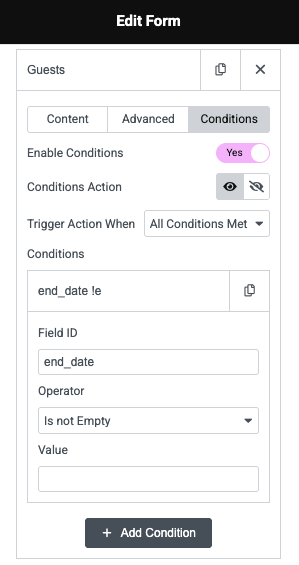
Easily control which fields appear in your Elementor form using conditional logic. You can show or hide fields automatically depending on the user’s previous selections or input values. This feature supports a wide range of field types including text, textarea, email, phone, URL, radio, select, file upload, HTML, number, and checkbox fields — giving you total flexibility to create dynamic, user-friendly forms.
AND/OR Conditions
Combine Multiple Conditions
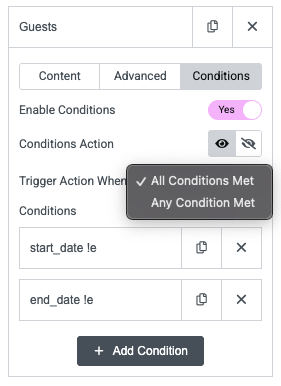
Take your form logic further by adding multiple rules to a single field. The widget uses AND logic, meaning all conditions must be true before an action is triggered — giving you precise control over complex form workflows.
If/Else Logic
Code-Free If/Else Logic
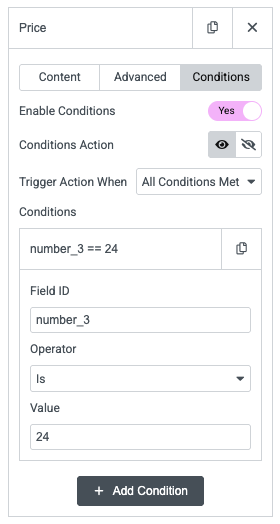
No need to write a single line of code to create smart form behaviors. With simple if/else conditions, you can decide when a field should appear or stay hidden. Just reference the field ID you want to base your condition on. For example, if the field ID is number_3, you can display the “Price” field only when number_3 equals “24”
No Error
Seamless Form Validations
When a field is hidden based on your conditions, it’s automatically excluded from validation. This prevents unnecessary form errors and ensures a smooth, frustration-free experience for users filling out your forms.