Allow users to submit and update content directly from the frontend of your site — without giving them access to the WordPress dashboard.
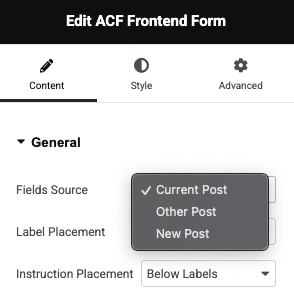
Choose where your form pulls data from:
Current Post – Edit fields of the post being viewed.
Other Post – Specify a different post or object ID.
New Post – Let users create new posts from the frontend.
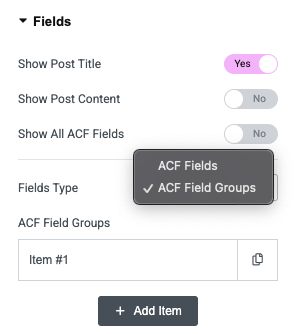
Decide which fields to show and how:
Show post title, content, and all or selected ACF fields.
Add fields individually or include entire ACF field groups.
Customize label placement (top or left) and instructions positioning for a polished, user-friendly form layout.
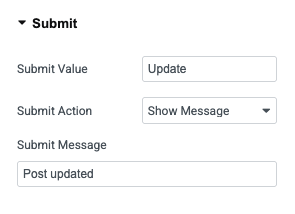
Decide what happens after the form is submitted:
Show a success message (e.g., “Post submitted successfully”).
Redirect users to another page (thank-you page, profile page, etc.).
Customize the button text to say Submit, Update, Save Changes, or anything you like.
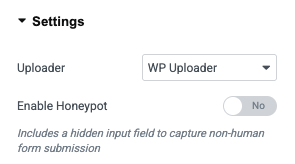
Enable users to upload images, documents, or media with:
WordPress Uploader – Full media library integration with drag-and-drop support.
Basic Uploader – Lightweight file input field for simple uploads.